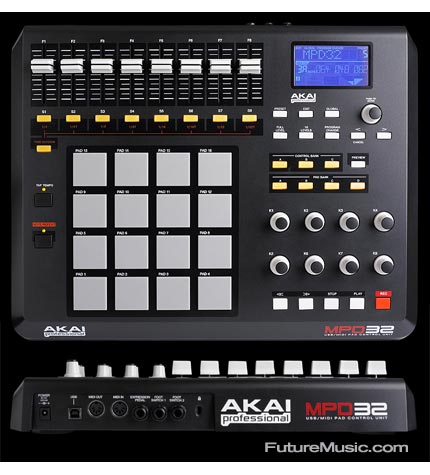
AKAI MPD32 Midi Controller

Laptops, effects pedals, powerdrills.

Moderator: snailed

Post Reply
kristin
Posts: 39
Joined: Wed Mar 18, 2009 6:31 am

AKAI MPD32 Midi Controller

Post by kristin »

Image

when i tell my friend Jan i want to make music, he gave me this as a gift and then vanish into thin-air... i have no clue what it is.... and what i can do with it.... ??

anyone here can tell me what it is and what i can do with it?

yeah did some google and still ain't got a clue : )
that shows how much i know about music making

he also give me this...

Image
Last edited by kristin on Mon Jul 27, 2009 12:36 pm, edited 3 times in total.
your days of plenty are OUTNUMBERED!

kristin
Posts: 39
Joined: Wed Mar 18, 2009 6:31 am

Re: AKAI MPD32 Midi Controller

Post by kristin »

and oh, just found 2 contact-mic in the box as well, other than that all i have is an apple computer with ableton live!

: )
your days of plenty are OUTNUMBERED!

User avatar
yonhosago
Posts: 972
Joined: Sun May 11, 2008 1:30 pm

Re: AKAI MPD32 Midi Controller

Post by yonhosago »

Wish I had friends like that.
classically trained

cheapmachines
Posts: 264
Joined: Wed May 14, 2008 5:43 pm
Location: London
Contact:

Re: AKAI MPD32 Midi Controller

Post by cheapmachines »

Both of the devices are basically interfaces between your computer and the outside world.

The Alesis MultiMix8 can connect to your computer via the firewire socket, this then can be used to plug in microphones or other musical instruments in order for you to record them within Abelton Live or whatever other software you may have. You could, for example, connect your new contact microphones to the mixer and record what they pick-up in Abelton (in theory at least....)

The Akai Midi Controller can be assigned to control the knobs/faders/parameters you see on screen in Abelton (rather than using a mouse or track pad in the usual way). It can also be used to control the functions of Midi equipped devices such as samplers, drum machines and sequencers.

Both models are fairly current, I'm surprised your Googling didn't find anything:

http://www.akaipro.com/mpd32
http://www.alesis.com/multimix8firewire

kristin
Posts: 39
Joined: Wed Mar 18, 2009 6:31 am

Re: AKAI MPD32 Midi Controller

Post by kristin »

thanks for the reply phil,

and yes i understand how the mixer works, and already playing with my new contact-mic : )

my question is on the Akai Midi Controller, and thanks your desription it does make it clearer/simpler than those i found on google : )
i did looked at the akai link you sent me, but still scratching my head after i read them! i'm basically clueless if you want to know the truth : )

anyway, more suggestions on how i can make use of the akai thing (in a more EAI way maybe... description and video i found online are rather drum'n'bass/djing crap) is welcome.... feed me!!
Last edited by kristin on Mon Jul 27, 2009 3:14 pm, edited 1 time in total.
your days of plenty are OUTNUMBERED!

kristin
Posts: 39
Joined: Wed Mar 18, 2009 6:31 am

Re: AKAI MPD32 Midi Controller

Post by kristin »

cheapmachines wrote:It can also be used to control the functions of Midi equipped devices such as samplers, drum machines and sequencers.
samplers - does that means i need to get a sample machine of sorts? dang! stupid question i know... what i mean is, is there any other way i can feed a sample to the machine? say a mp3/cd player??

drum machines - not interested!

sequencers - what is this??? hehe
your days of plenty are OUTNUMBERED!

User avatar
Stephen
Posts: 1030
Joined: Sun May 11, 2008 6:24 am
Location: Bristol UK
Contact:

Re: AKAI MPD32 Midi Controller

Post by Stephen »

Well, try plugging your Akai into your computer, turn it on, open Ableton Live. Press [apple] and [comma] and go to the Midi section of that menu. You should be able to see if Live recognises your Akai. If it doesn't you need a driver (probably downloadable or on the cd that came with Akai).

If it does select the Akai as your midi input device and close the preferences. Then in the main Live window, there's a little button called midi in the top right, click that and a load of stuff should go blue. These are things you can control with the Akai. You could use the buttons to play samples that you have on your computer (pretty much all formats I think), so no you don't need another sampler really.

Sequencer: http://en.wikipedia.org/wiki/Music_sequencer

Live has this built in too, in fact it's the only bit of it I ever use these days.
Last edited by Stephen on Mon Jul 27, 2009 5:26 pm, edited 1 time in total.

cheapmachines
Posts: 264
Joined: Wed May 14, 2008 5:43 pm
Location: London
Contact:

Re: AKAI MPD32 Midi Controller

Post by cheapmachines »

kristin wrote:samplers - does that means i need to get a sample machine of sorts? dang! stupid question i know... what i mean is, is there any other way i can feed a sample to the machine? say a mp3/cd player??
You're not "feeding" the Akai with anything strictly speaking, all it does is to provide a useful set of knobs, pads and faders that you can assign to control whatever device you have plugged into it. Think of it as a really nice, clever dashboard as opposed to an engine ;)

If it was me, I'd try Stephen's steps to get it to talk to Abelton as a kick off point. Seeing as Abelton is a fully featured sampler and sequencer in it's own right, you can potentially use the Akai to have manual, real-world type control over the software, rather than fiddling about on the screen to control everything.

So no, you don't have to go out and buy a sampler, you've already got one in the shape of Abelton. I was just using "a sampler" as an example of the kind of stand-alone units that can be controlled with the Akai.

Between the Akai, the mixer and Abelton, you've got more than enough gear to start making whatever electronic music you choose. You will need to think about microphones if you plan to record any acoustic instruments, but you've got a good little set up there to kick you off already.

kristin
Posts: 39
Joined: Wed Mar 18, 2009 6:31 am

Re: AKAI MPD32 Midi Controller

Post by kristin »

thanks guys,
very helpful, will try that and play around with it :)
much appreciated!
your days of plenty are OUTNUMBERED!

User avatar
flies
Posts: 729
Joined: Wed Jun 18, 2008 9:29 am

Re: AKAI MPD32 Midi Controller

Post by flies »

the akai is a controller. most people would buy it to use with software, such as ableton live. a typical use would be to use the pads to trigger samples using a software sampler, while the knobs might control things like the filters. (it can also be used with hardware, but if you don't already have a sampler, then don't worry about it.)

ableton has some very serviceable samplers in it. i believe one of them is called impulse. i'll bet you can find a pre-built tool to map the akai's controllers to impulse controls.

using ableton live for EAI is going to mean stretching its capabilities beyond what it was designed to do, but i believe that's pretty much the name of the game when it comes to this music. i'd start just getting used to triggering samples, then find some effects that scramble the sounds in an interesting way, then figure out how to use the knobs and sliders to modify the effects.

I don't know how flexible the midi routing is in ableton (i imagine it's quite good). but if you're having ideas about ways to use the akai that the routing doesn't satisfy, get a hold of PD to do your midi routing. PD will allow you to do anything with midi that you want. (keep in mind that while PD is a huge program that can be hard to learn if you really want to get into it, learning how to get PD to take in an akai pad hit and have it tell ableton to trigger a loop (with a second pad hit stopping it, say) should be doable.)

User avatar
flies
Posts: 729
Joined: Wed Jun 18, 2008 9:29 am

Re: AKAI MPD32 Midi Controller

Post by flies »

if you want my advice:

use your mixer's firewire capability to route your contact mic's into the computer, then use the computer to modify the sound. use the akai to control the software. the pads will probably be most useful to you as binary switches, so that a pad will turn on/off a certain effect or something like this. use the knobs and sliders to control filters, delays, etc.

The advantage of this approach is that it will give you a physically responsive tool to start with (whatever you mic up). this will make it much, much easier for you to get interesting, varied sounds. playing around with software as a sound source is more challenging, more likely to sound canned and lifeless, especially if you're not already familiar with what software can do. using software as a sound modifier will likely prove a much more fruitful approach.

if you're looking for good effects, i can't recommend smartelectronix enough. http://www.smartelectronix.com/ . i recommend all the destroyFX http://destroyfx.smartelectronix.com/ effects as well as koen tanghe's KTGranulator effect. magnus' ambience is a decent reverb, and it has a 'freeze reverb' function that you might enjoy http://magnus.smartelectronix.com/. everything here is free (ambeince has a nag screen).

Again, PD may help you get the most out of your akai controller, but don't bother with it at first because it can be a headache.

Return to “I Hate Making Music”